
WordPress Add-on
Extra Security
PrivateContent add-on

Two-factor authentication


Demo user: test3 - Password: test
Passwords alone are not enough anymore. Two-factor authentication (2FA) adds a second identity check on top of the standard login, so a stolen or guessed password is no longer enough to get in, protecting your users and your reputation.
You stay in control: let users set it up on their own, force it at first login, or require it directly during registration. However you configure it, your users can manage everything themselves from a dedicated frontend panel: no extra support requests for you to handle.
One add-on, real enterprise-grade security, set up in minutes and ready to protect every account on your website from day one!
Give a try using the login form aside with these credentials to see how it is integrated.
Four methods to choose from
A 6-digit code is sent straight to the user's inbox. Simple and familiar. No app to install, no setup required
A 6-digit code is sent by SMS straight to the user's phone. Fast, familiar and reliable. No app to install, no setup required
A time-based code generated by an authenticator app (eg. Google Authenticator, Microsoft Authenticator, Authy)
Users set their answers to generic questions once, then confirm them whenever it's needed. Simple and memorable.
Re-verify identity for sensitive actions
Two-factor authentication protects the login, but what happens after a user is already in? Session hijacking, an unlocked device, a shared computer: any of these can let someone else perform critical actions under a legitimate account.
The 2FA Gate closes that gap. It re-asks for identity verification right before a sensitive action is completed, like an account deletion, a subscription plan change, or virtually any user interaction you want to target!
Once verified, a short trust window keeps things smooth. Your users won’t be asked again for every gated action within the same session, so security never gets in the way of a good experience.
Check the video of a live-demo of the self account deletion gate.
Restrict access by location
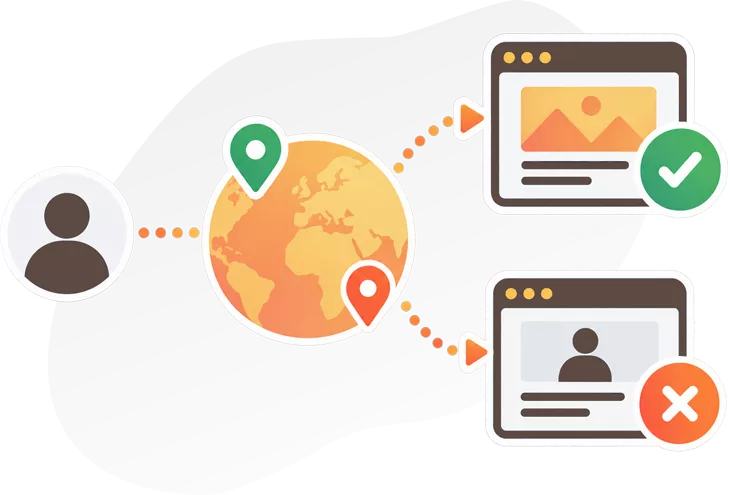
Not every visitor should be treated the same. If your content, your offer or your compliance requirements are tied to specific countries, geo-restriction lets you control exactly who is allowed to log in or register based on where they are connecting from.
Choose to allow only selected countries or continents, or block specific ones, and apply the restriction to login, registration, or both. A whitelist keeps your admins and trusted IPs always able to get in, no matter where they are.
Blocked visitors see a custom message of your choice, so even a restriction feels like part of your brand and not a generic error page.
Like any location check based on IP address, it won’t stop a determined user behind a VPN, but it’s a solid first line of defense against casual, unwanted access from the wrong places.
Automatically close inactive sessions
An account left logged in on a shared computer, a forgotten tab on a public device, a session open long after the user has walked away: these are all open doors for anyone who comes next.
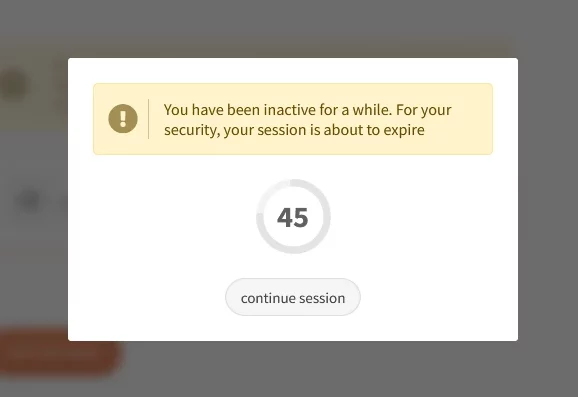
Automatically close inactive sessions after a time you decide, no matter how the user is logged in. Before that happens, a friendly popup gives them the chance to stay connected with a single click, so nobody gets logged out while they’re still actually working.
Set the inactivity time and, if you like, customize the warning message to match your website’s tone.
A small detail that makes a real difference for the security of every account on your site.

Recognize and track user devices
A login from a device that has never been seen before is often the first sign that something is wrong: a stolen password, a shared account, or simply someone who shouldn’t be there.
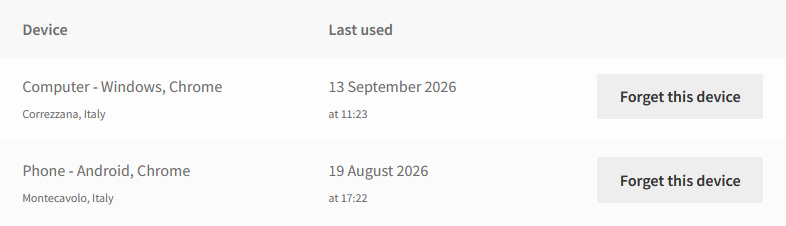
Device recognition keeps track of every device used to log into each account. The first time a new one shows up, the user gets an instant e-mail notification, so they can react immediately if it wasn’t them.
You decide how many devices a single user can be logged in with at the same time. Once the limit is reached, an old device has to be let go before a new one can take its place, keeping accounts from being shared or used from an endless list of devices.
Users stay in control too, with a dedicated panel to review and forget their own devices whenever they want!

The LCweb Guarantee
The plugin is completely translatable: both on frontend and admin sides.
Tested to work seamlessly with WPML and Polylang. Plus, frontend elements have already been translated in several languages!
To use premium plugins often means having to update them manually, losing time and teaching customers additional procedures.
Forget it. You can now update LCweb plugins directly from WordPress!
Featuring thousands of solved tickets in more than a decade, LCweb is famous for its efficient support.
Each ticket normally get answered in 12 hours, 7 days a week, talking directly with the developer
More than a simple plugin
Purchasing this plugin you make a true investment. Born years ago, has rock-solid background and has been tested on thousands of websites!
It gets constantly developed with new features and using best web solutions! Taking advantage of the continuous support flow, bugs get fastly fixed with highest priority.
LCweb develops state-of-the art premium WordPress plugins since 2011 and is totally focused on customers satisfaction, every day of the week!
for the future
instant bug fixes
thousands


LICENSE
$25 year
- WordPress plugin package
- Lifetime license with 2-years updates
- 1-year automated updates
- 1-year premium support
- Automated license and support service registration
- 15 days money-back guarantee
- Automatic renewal (optional)
Save
7%
LICENSE
$25 year
- WordPress plugin package
- Lifetime license with 2-years updates
- 1-year automated updates
- 1-year premium support
- Automated license and support service registration
- 15 days money-back guarantee
- Automatic renewal (optional)
- 3
- 5
- 10
- 20
- websites